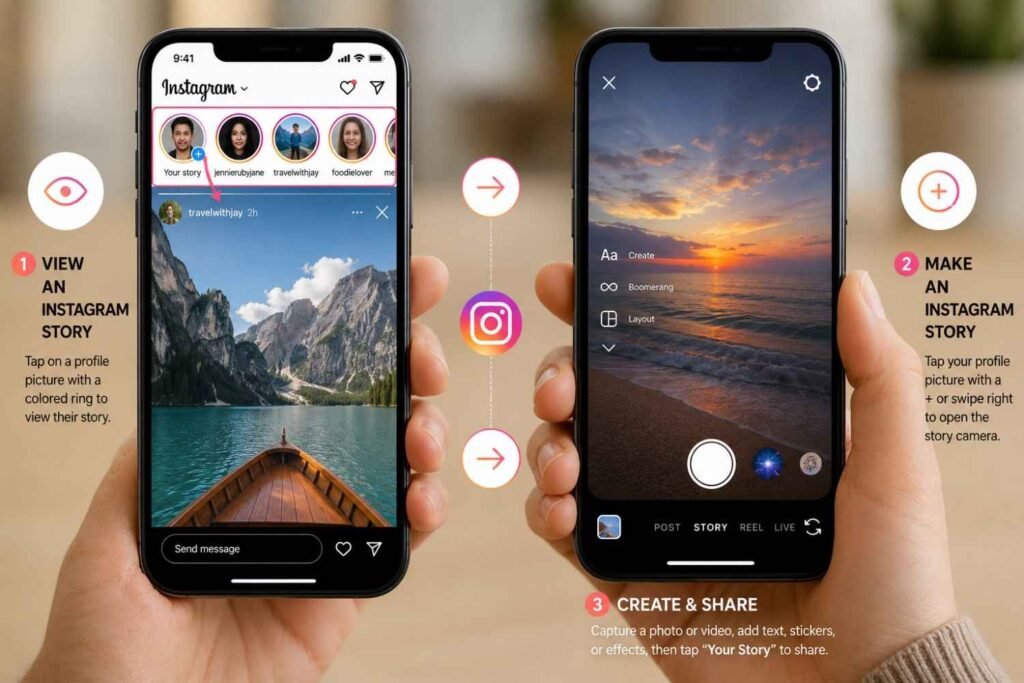
Stories vanish after 24 hours. Tap a colored ring to view one. Swipe right to make one.
What Is an Instagram Story?
A photo or video that disappears from Instagram after one day.
Here is the honest version of what Stories actually are. They are not your main posts. They are not Reels. They are not Highlights. They are the stuff you want people to see today, not forever. A behind-the-scenes clip. A quick update. A poll asking your audience what they think. Gone tomorrow. That is the whole point.
Your regular feed grid sits there permanently. Reels get pushed to people who do not follow you. Highlights are the curated collections you pin to your profile. Stories do none of that. They live at the top of the feed for 24 hours, then they disappear unless you step in and save them.
Private accounts: only your followers see your Stories. Public accounts: anyone on Instagram can. You can also hide Stories from specific people, or use Close Friends to share something with a smaller group. That level of control is actually one of the more useful parts of the feature. Pairing Stories with a thought-out content writing strategy is one of the more reliable ways to stay consistently visible without burning out on polished content.
How to View an Instagram Story
Tap the profile photo with the colorful ring around it.
Open Instagram. Look at the top of your home feed. You will see a row of circular profile photos. The ones with a colored ring around them have a new Story waiting. No ring means nothing new. Simple enough.
Tap the ring and the Story starts. It plays automatically. Want to skip to the next slide? Tap the right side of the screen. Want to go back? Tap the left. Hold your finger down to pause. Swipe down or hit the X to get out.
Now, about anonymous viewing. Instagram does not offer it. The creator sees exactly who watched. Every single view is logged and visible to them. There are third-party tools that claim to work around this, but most of them either stopped working or require you to log in with your account credentials, which is a terrible idea. For businesses, that viewer list is actually valuable. Knowing who is watching your Stories is real engagement data, the same way tracking crawl behavior matters in technical SEO.
How to Make an Instagram Story
Swipe right anywhere on your home feed, or tap the plus icon on your profile photo.
Both get you to the same place: the Story camera. From there, you have three ways to add content. Take a new photo by tapping the white circle. Record video by holding it. Or skip the camera and swipe up to pull something from your phone’s gallery.
Once you have something to work with, the editing tools are lined up along the edges. The “Aa” icon adds text. Pick your font, pick your color, resize it however you want. The sticker icon is where things get interesting. Music sticker: search for a song, pick a clip, pin it to the Story. GIF sticker: pulls from Giphy. Swipe left or right on the image to cycle through color filters.
The link sticker is worth knowing about. If it is available on your account, you can attach a URL directly to the Story. That means sending people straight to a product page, a blog post, or your services page without making them hunt through your bio. When you are ready, tap “Your Story” to post to everyone, “Close Friends” to limit it, or the arrow icon to send it as a DM.
Instagram Story Features Worth Using
The interactive stickers. They are what actually get people to respond.
Poll stickers are the easiest starting point. Write a question, set two options, people tap. You see the results in real time. Question stickers are different. You write a prompt, followers type their own answers, and you can share the responses back to your Story. Good for Q&As, feedback, or just starting a conversation.
Quiz stickers let you set a multiple-choice question with a correct answer. Emoji sliders are lower commitment. People just drag an emoji to show how they feel about something. Countdown stickers build anticipation. Set a date and time, and the sticker counts down live.
For discoverability, location tags still work. They put your Story in front of people searching that area, which pairs naturally with a local SEO approach if you are trying to reach a specific city or region. Hashtags add a similar layer of reach. Mentions notify whoever you tag, and they will often reshare your Story to their own audience.
How to Save an Instagram Story
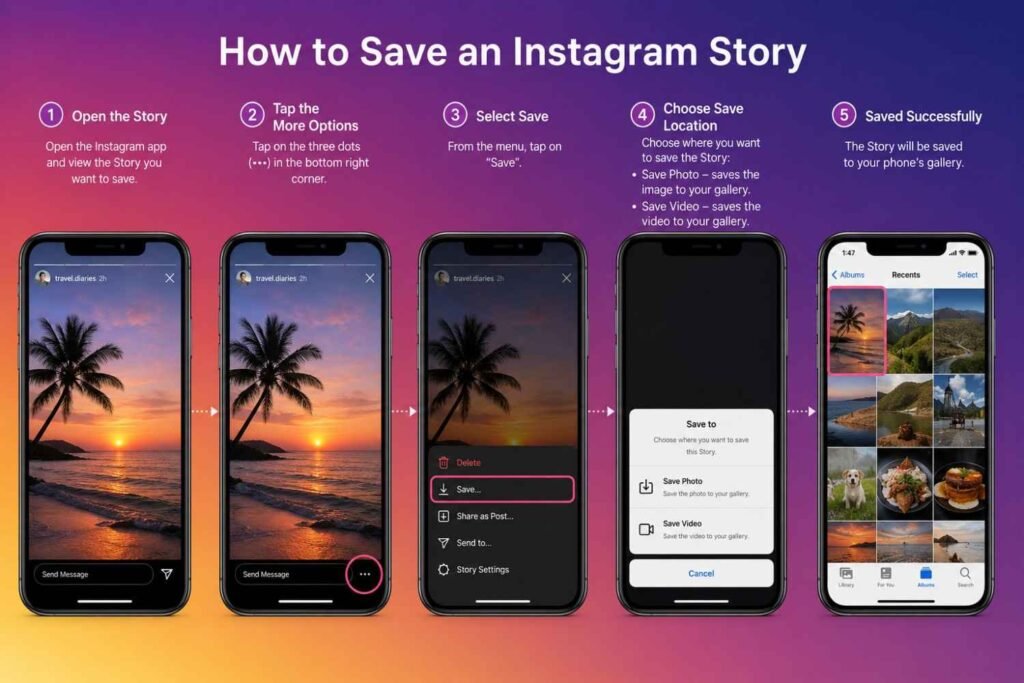
Save before posting, or pull it from your Archive after it expires.
Before you post, tap the three-dot menu in the top right of the editor. Hit “Save.” It goes straight to your camera roll. Done.
After a Story expires, Instagram stores it in your private Archive, provided you have that setting turned on. Nobody else can see the Archive. It is just yours. From there, you can re-download old Stories, re-share them, or move them into Highlights.
Highlights are the pinned collections that live on your profile just below your bio. They do not expire. You can organize them into categories, give them custom covers, and label them however makes sense for your brand. FAQs, customer testimonials, service breakdowns. Think of them as the permanent home for your best Story content. If you are running a SEO company Dubai or any kind of service business, Highlights are one of the first things a new profile visitor will check.
How to Control Who Sees Your Stories
Instagram gives you multiple privacy options, and they are easy to set up.
The most direct tool is “Hide Story From.” Go to Settings, then Privacy, then Story. Select the accounts you want to block from seeing your Stories. They will not get a notification. They just will not see your content anymore, even if they follow you.
Close Friends works the other way. You build a list of specific people, and when you post a Story you can choose to send it only to them. Those viewers see a green ring instead of the usual colorful one. It is a clean way to share something that is not meant for your full audience.
Reply settings are worth checking too. You can open replies to everyone, restrict them to people you follow, or turn them off entirely. There is also a toggle for whether followers can share your Stories into their own DMs, and whether they can add your feed posts to their own Stories.
Common Story Problems and How to Fix Them
Most issues trace back to the app version, the connection, or the file format.
Stories not loading? Check if your app needs an update. Outdated Instagram versions break things regularly. If the app is current, try switching from Wi-Fi to mobile data or the other way around. A flaky connection is the most common reason Stories stall mid-load. Account restrictions can also block content, but that is less common and usually comes with a notification.
Upload failing? The file format is the first thing to check. Instagram takes JPEG, PNG, MP4, and MOV. Anything else will not go through. If the format is fine and it is still not working, restart the app. If that does not help, restart your phone. Low storage on your device can also cause silent upload failures.
Blurry Stories are almost always a source quality issue. If the original file was recorded at low resolution or compressed before you uploaded it, Instagram cannot fix that. The platform also applies its own compression on top, which makes things worse. Go into your Instagram settings, find Data Usage, and switch on “Upload at highest quality.” Post on a solid connection and the results will be noticeably better.
Instagram Story Best Practices
Vertical format, captions, consistency, and always give people somewhere to go next.
Shoot or export in 9:16. Stories that are not vertical get cropped or letterboxed. Neither looks good. A lot of people watch with the sound off, so add text or captions that carry the message on their own.
Post regularly. Your profile photo shows up at the front of the Story row when you have something new. Go quiet for a few days and you drift to the back. You do not need to post constantly, but staying present matters. Use interactive stickers on most posts. They turn passive viewers into active participants, and that activity signals to Instagram that your content is worth surfacing.
Keep the visual style consistent. Same fonts, same colors, same general feel. And always end with a next step. Tell people what to do after watching. Visit a link, check your latest post, read something new on your blog. A Story without a direction is a missed opportunity.
Instagram Story vs Instagram Reel
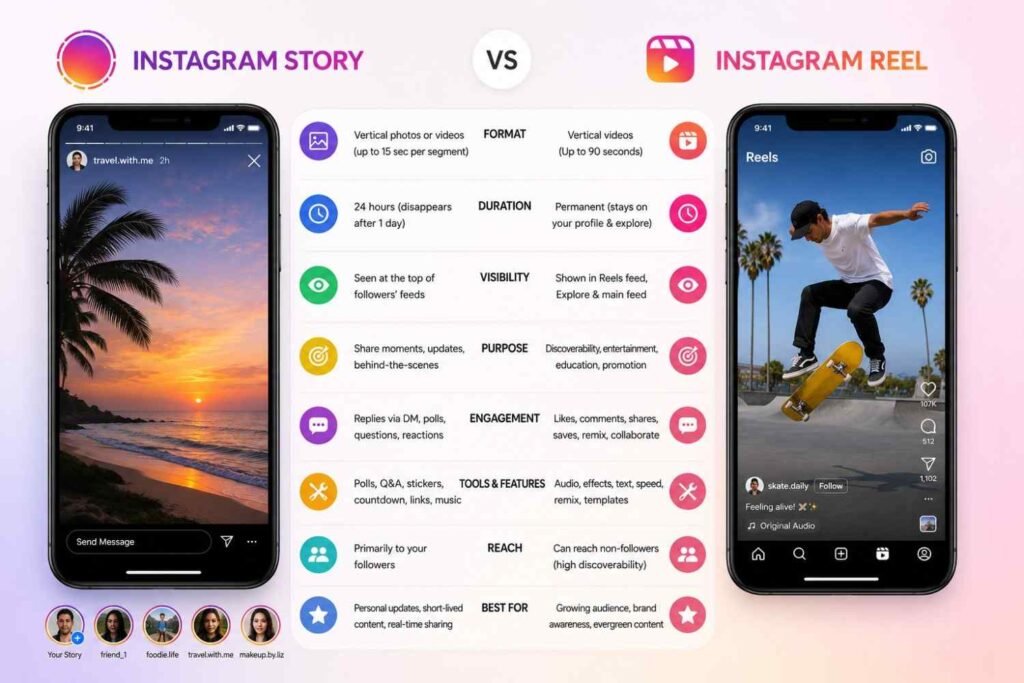
Stories are for your current followers. Reels are for finding people who do not follow you yet.
| Feature | Instagram Story | Instagram Reel |
|---|---|---|
| Visibility | 24 Hours | Permanent Until Deleted |
| Discovery | Mostly Followers | Followers and Non-Followers |
| Length | Short Updates | Longer Content |
| Engagement | Direct Interaction | Reach and Growth |
| Best Use | Daily Updates | Audience Expansion |
Stories are one of the more practical features Instagram offers, especially for brands and creators who want to stay visible without committing to a polished post every day. Once you get the workflow down, creating and managing them takes almost no time. Folding Stories into a broader digital strategy, including things like Generative Engine Optimization, gives your content more ways to reach people and more reasons for them to keep coming back.
Frequently Asked Questions
How do I view Instagram Stories?
Open Instagram and tap a profile photo with a colored ring around it at the top of your feed.
How long do Instagram Stories last?
24 hours. After that they disappear unless you save them to your Archive or add them to a Highlight.
Can I save an Instagram Story after posting?
Yes. Expired Stories move to your private Archive automatically. Download them from there or add them to a Highlight.
Can someone see that I viewed their Story?
Yes. Instagram logs every view and shows the creator a full list.
Can I add music to an Instagram Story?
Yes, through the Music sticker in the Story editor.
Can I make a Story visible only to selected people?
Yes. Use the Close Friends list, or use “Hide Story From” to block specific accounts.