Here’s something we hear all the time from business owners: “We spent six months talking to developers, got quotes that ranged from $5,000 to $150,000 for the same project, and we still don’t know what we’re actually paying for.”
That gap in understanding is where most app projects go wrong. Not in the coding. Not in the design. In the planning, the communication, and the expectations.
This guide is written for business owners who want a real answer to how mobile app development works, not a glossy overview. We’ll cover what the process actually looks like, what drives cost and timeline, which platform makes sense for your situation, and what separates apps that succeed from the ones that get quietly abandoned six months after launch.
What Is Mobile App Development, and Why Does Your Business Need One?
Mobile app development is the process of building software that runs on a smartphone or tablet. That sounds simple enough. But in practice it covers a lot of ground: figuring out what the app should do, designing how it looks and feels, writing the code that makes it work, testing it across devices, getting it onto the App Store or Google Play, and then keeping it running and improving it after launch.
The reason businesses invest in apps comes down to one thing: that’s where your customers are. People spend more time on their phones than anywhere else. They shop on phones. They book appointments on phones. They check in, track orders, and get support on phones. If your business has a clunky mobile website or no mobile presence at all, you’re losing customers to competitors who made it easier.
A well-built app doesn’t just give you a mobile presence. It gives you a direct channel to your customer that you control. No algorithm changes, no platform fees eating into your margins. Just a direct line.
Native, Cross Platform, or PWA: What’s the Difference and Which One Do You Need?
This is where a lot of business owners get confused, and it’s worth spending a few minutes here because the choice genuinely affects your budget, your timeline, and what your app can actually do.
Native apps are built from scratch for one specific platform. iOS apps are written in Swift. Android apps use Kotlin or Java. Because they’re designed for one operating system, they run fast, feel smooth, and have full access to everything on the device: camera, GPS, biometrics, push notifications, the works. The downside? If you want to be on both platforms, you’re essentially building two separate products. That doubles your development cost and your maintenance overhead.
Cross platform apps take a different approach. Frameworks like Flutter and React Native let developers write one codebase that runs on both iOS and Android. The performance gap between cross platform and native has narrowed significantly over the past few years. For most business use cases, you won’t notice the difference. And the cost savings are real. If your budget is limited and you need to reach both audiences, cross platform is usually the smarter first move.
Progressive Web Apps are a different animal entirely. They run in a browser. No download, no installation. They work on any device, they’re fast to build, and they cost a fraction of a full native or cross platform build. If your goal is giving customers quick access to information or a simple service, a PWA might be all you need. They’re not right for everything, but they’re underused by businesses that could benefit from them.
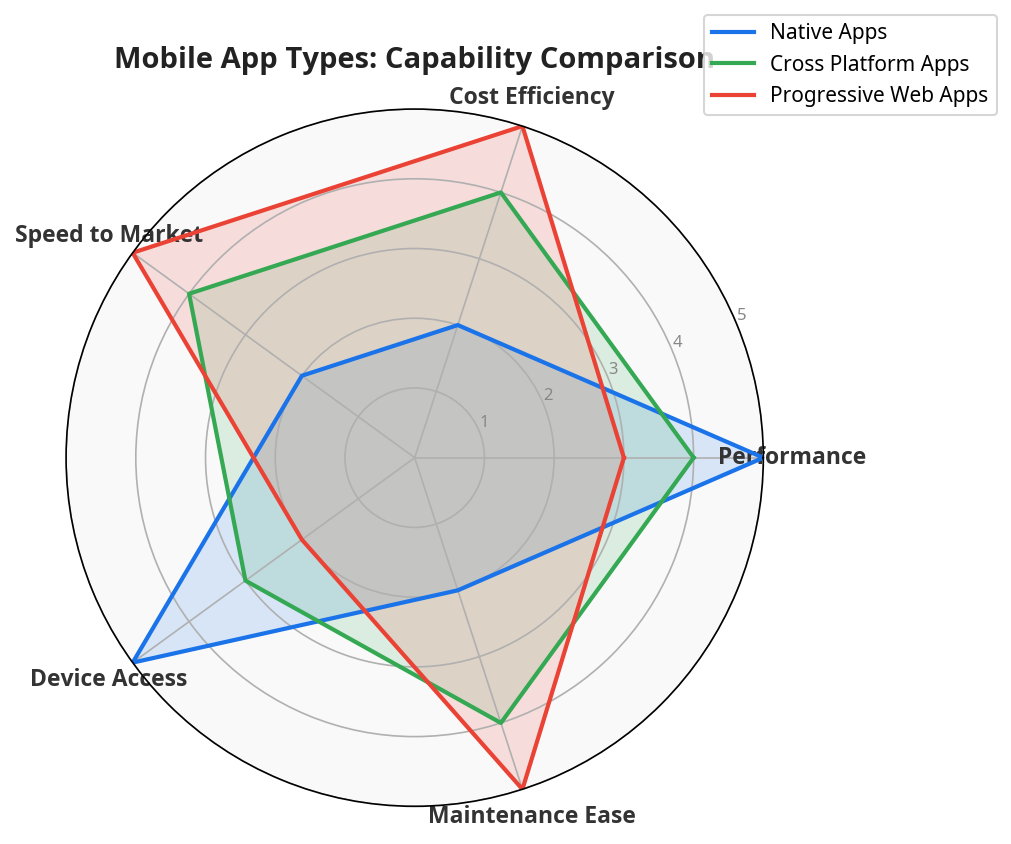
The radar chart above compares all three app types across five key dimensions. Native apps lead on performance and hardware access. PWAs win on cost and speed to market. Cross platform sits in the middle and offers a strong balance across all five areas.
| Feature | Native Apps | Cross Platform Apps | Progressive Web Apps |
|---|---|---|---|
| Performance | High | Medium to High | Medium |
| Development Cost | High | Medium | Low |
| Time to Market | Slow | Fast | Very Fast |
| Device Hardware Access | Full | Partial | Limited |
| App Store Distribution | Yes | Yes | No |
| Offline Functionality | Full | Full | Partial |
| Best For | Feature-rich apps | Budget-conscious launches | Content and service apps |
How Mobile App Development Actually Works: The 7 Steps That Matter
A lot of clients come to us thinking development starts on day one. It doesn’t. The work that happens before a single line of code gets written is what determines whether the project succeeds or ends up as a cautionary tale.
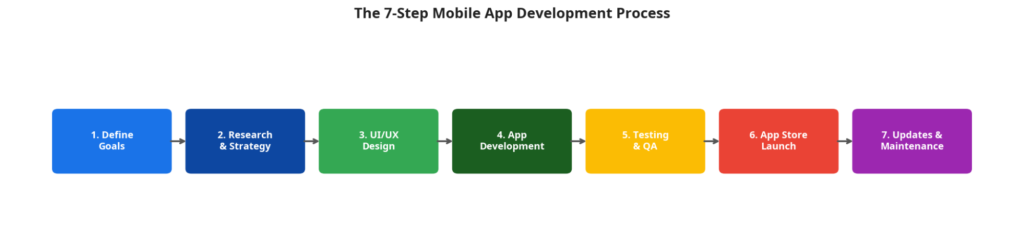
Step 1: Get Clear on What You’re Actually Building
This is the step most people rush through, and it’s the one that causes the most problems later. “I want an app like Uber but for dog walkers” is not a brief. It’s a starting point for a conversation.
Before development begins, you need specific answers to three questions. Who is the primary user? What is the one core thing they need to do? And how will you measure whether the app is working six months after launch? Vague answers here produce vague apps. And vague apps cost more to fix than they did to build wrong.
Step 2: Research What Already Exists and What Users Actually Want
Once you’ve defined what you want to build, you need to find out whether users actually want it. That means looking at what’s already out there, reading the reviews of similar apps to find the complaints that keep coming up, and if possible, talking to real potential users before you commit to a feature list.
This research isn’t optional. It’s how you avoid spending five months building something that already exists, or something that sounds great in a boardroom but nobody actually uses.
Step 3: Design the Interface and the Experience
UI design is what the app looks like. UX design is how it feels to use. They’re related but different, and both matter.
Here’s the thing about UX: a beautiful app that’s confusing to navigate gets deleted. A plain app that’s effortless to use gets recommended. Designers build wireframes and interactive prototypes at this stage, and those prototypes get tested with real users before any code is written. Catching a navigation problem in a prototype costs almost nothing. Catching it after development is finished costs a lot.
Step 4: Build the Thing
Development happens in two layers. The front end is everything the user sees and touches. The back end is the infrastructure that makes it work: servers, databases, APIs, authentication, all of it. Most teams work in two-week sprints, which means you’re reviewing progress regularly and can course-correct before small problems become expensive ones.
Step 5: Test It Properly Before Anyone Else Sees It
Testing isn’t a box to tick at the end. A proper QA process covers functional testing to make sure every feature works as intended, performance testing to see how the app holds up under real load, security testing to find vulnerabilities before bad actors do, and device testing across a range of screen sizes and OS versions.
Apps that skip thorough testing launch with bugs. Bugs get one-star reviews. One-star reviews are very hard to come back from.
Step 6: Get It Live on the App Store
Submitting to the Apple App Store or Google Play isn’t as simple as uploading a file. Both platforms have review processes, technical requirements, and content policies. Your app listing also needs to be optimized: the right keywords, compelling screenshots, a description that tells users what the app does in the first two lines. A strong listing drives organic downloads from day one. A weak one means you’re invisible.
Step 7: Maintain It After Launch
The app doesn’t stop needing attention once it’s live. OS updates, new device sizes, user feedback, and changing business requirements all create ongoing work. Budget around 15% to 20% of your initial build cost per year for maintenance. Teams that treat maintenance as optional end up with apps that break, collect bad reviews, and eventually get abandoned.
Android, iOS, or Cross Platform: How to Make the Right Call
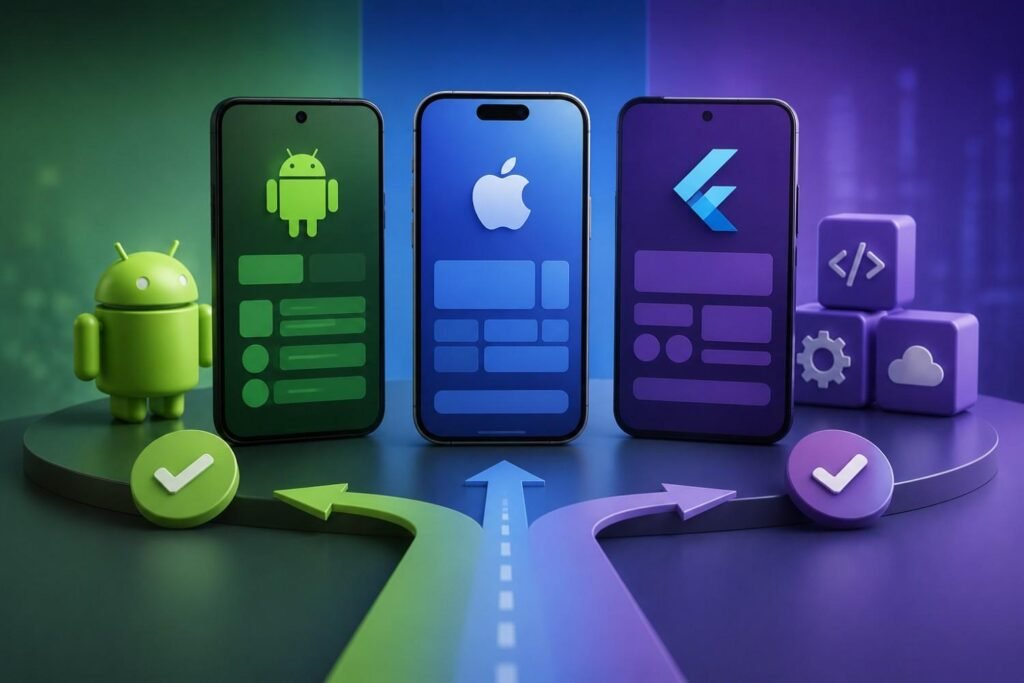
The honest answer is that it depends on your audience, and anyone who tells you otherwise is guessing.
If your users are primarily in markets where Android dominates, start with Android. If you’re targeting high-value consumers in North America or Western Europe who tend to use Apple devices, iOS is the stronger first move. If you want to reach both audiences without doubling your budget, cross platform is the most practical path for most businesses at the early stage.
| Platform | Best For | Strengths | Considerations |
|---|---|---|---|
| Android | Global audience, flexibility | Larger market share, open distribution | More device fragmentation to manage |
| iOS | Premium users, high engagement | Higher user retention, strong monetization | Stricter App Store guidelines |
| Cross Platform | Budget-conscious, fast launches | Single codebase, simultaneous launch | Slightly lower performance ceiling |
What Does Mobile App Development Cost? Here’s What Actually Drives the Price
Cost is the first question everyone asks. It’s also the hardest to answer without knowing the specifics of your project. But here’s what we can tell you: cost is driven by decisions you make, not by arbitrary agency pricing.
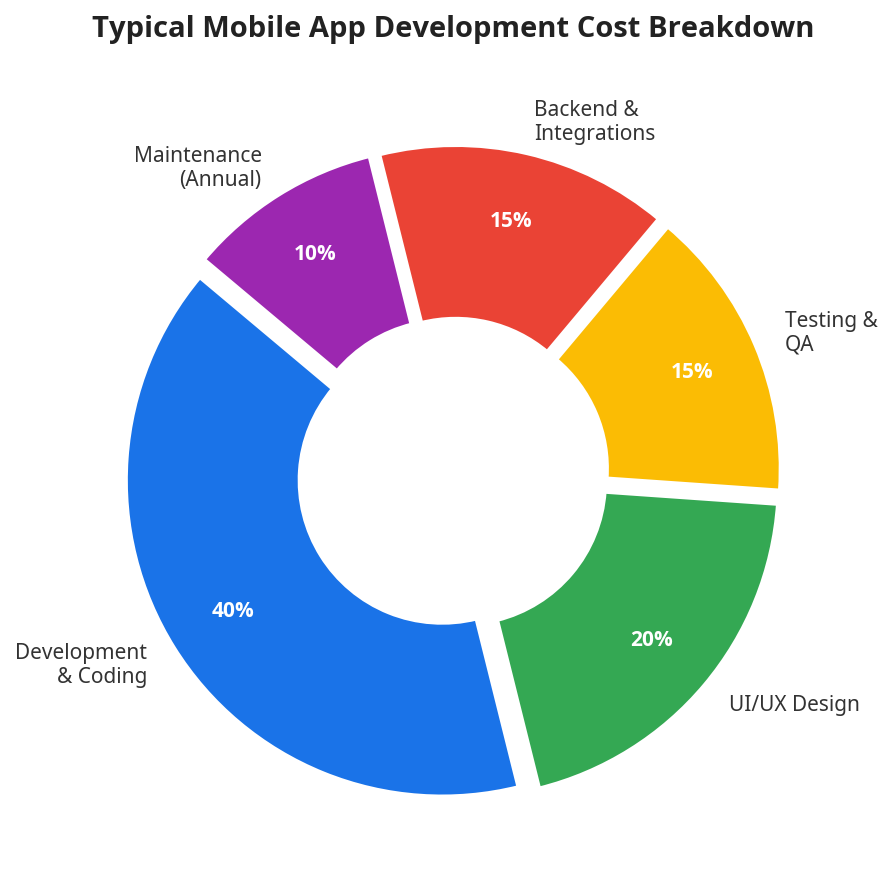
Development and coding take the largest share of the budget at 40%. UI/UX design follows at 20%. Testing, backend infrastructure, and ongoing maintenance each account for meaningful portions of the total investment.
| Cost Factor | Impact on Budget |
|---|---|
| App Complexity | Simple apps cost less; complex features add significant cost |
| Number of Features | Each additional feature increases development time and cost |
| Platform Selection | Two native apps cost more than one cross platform build |
| UI/UX Design | Custom designs cost more than template-based approaches |
| Third Party Integrations | Payment gateways, CRMs, and APIs add development hours |
| Annual Maintenance | Budget 15% to 20% of initial cost per year |
The single most common mistake we see is businesses that budget for the build but not for what comes after. The app isn’t a one-time purchase. It’s a product that needs ongoing investment to stay secure, compatible, and useful.
How Long Will It Take? Real Timelines, Not Optimistic Ones
Timeline is tied directly to scope. More features means more time. Here’s a realistic breakdown based on typical project complexity.
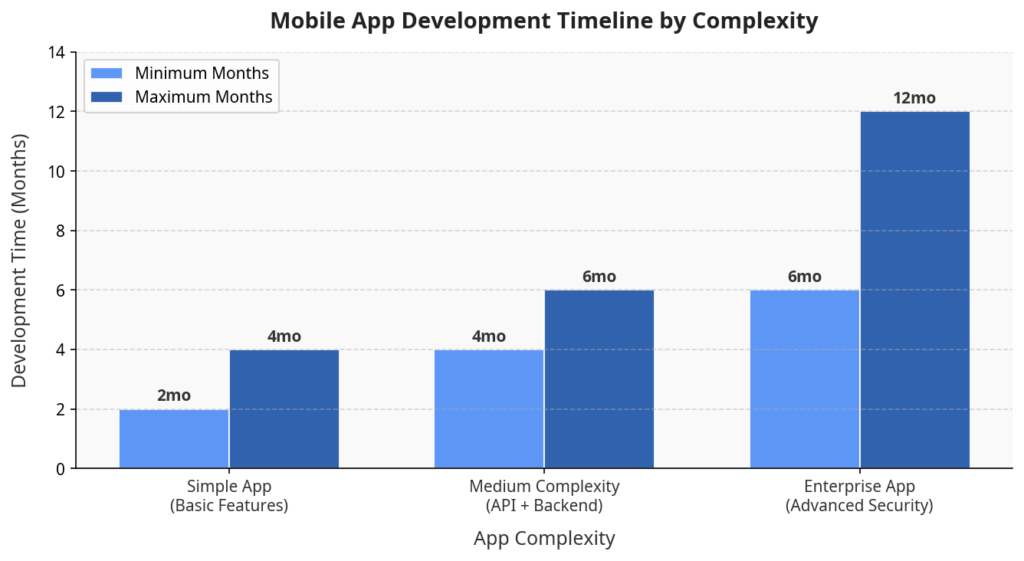
Simple apps can be live in as little as 2 months. Enterprise-level applications with advanced security and real-time features can take a year or more.
| App Type | Estimated Timeline |
|---|---|
| Simple App (basic features, standard UI) | 2 to 4 months |
| Medium Complexity App (API integrations, backend) | 4 to 6 months |
| Enterprise App (advanced security, real-time features) | 6 to 12+ months |
The most common cause of delays isn’t technical problems. It’s scope changes. Every time a new feature gets added after development starts, it disrupts work already in progress. Lock down your feature list before the build begins. That one decision does more to protect your timeline than anything else.
The Challenges Nobody Warns You About (Until It’s Too Late)
Every app project runs into obstacles. The ones that succeed aren’t the ones that avoid problems. They’re the ones that saw them coming.
Scope creep is the silent budget killer. It starts with small additions that seem harmless. “Can we just add a chat feature?” And it ends with a project that’s three months late and 40% over budget. A detailed scope document, signed before development starts, is your best protection.
Device fragmentation is a specific headache for Android. Your app needs to run correctly across hundreds of different devices running different OS versions. Comprehensive device testing is the only reliable fix.
Performance problems often don’t show up until the app is under real load. An app that runs perfectly in testing can slow to a crawl when thousands of users hit it at once. Load testing before launch catches these issues before your users do.
Security gaps aren’t just a technical problem. They’re a business problem. Users whose data gets compromised don’t come back. Security needs to be built into the architecture from the start, not added as an afterthought at the end.
Retention is the challenge that never goes away. Getting users to download your app is one problem. Getting them to come back is a completely different one. Consistent updates, responsive support, and content that keeps delivering value are what separate apps with strong retention from apps that get deleted after the first use. Our Content Writing services help businesses create in-app messaging and push notification copy that keeps users engaged well after the initial download.
What Separates Successful App Projects from Failed Ones
These aren’t abstract principles. They’re the patterns we see in projects that deliver real results versus the ones that stall out.
Start with an MVP. A Minimum Viable Product is the smallest version of your app that solves the core problem for your core user. Launch that first. Get real feedback. Then build from there. This approach costs less, ships faster, and dramatically reduces the risk of building something nobody wanted.
Design for the user, not for yourself. The features you find interesting aren’t necessarily the ones your users need. Let research and testing drive design decisions, not gut feeling.
Build security from day one. Encrypted data storage, secure authentication, and regular security reviews should be part of the architecture from the start. Retrofitting security after the fact is expensive and often incomplete.
Test on real devices. Emulators catch a lot of bugs. But real devices catch the ones emulators miss. Include physical device testing in your QA process.
Treat user feedback as a product input. App store reviews and in-app feedback are direct signals from your users about what’s working and what isn’t. Teams that respond quickly and act on feedback consistently build better products and stronger user trust.
How to Choose the Right Development Partner

The team you choose matters as much as the technology you build on. Here’s what to look for.
| Evaluation Criteria | What to Look For |
|---|---|
| Portfolio | Relevant industry experience and demonstrated quality |
| Technical Expertise | Proficiency in your required platform and tech stack |
| Communication | Responsive, transparent, and structured reporting |
| Development Process | Agile methodology with regular milestones and reviews |
| Post-Launch Support | Clear maintenance and update agreements |
Ask for case studies that show how the team handled problems, not just the projects where everything went smoothly. Any team can show you a polished success story. The ones worth working with can tell you what went wrong on a past project and exactly how they fixed it. You can explore our Portfolio to see how we approach digital projects across industries.
Mobile App Trends Worth Watching
The app landscape moves fast. These are the shifts that matter right now.
AI features are becoming expected, not impressive. Personalized recommendations, smart search, and in-app chatbots used to be differentiators. Now users expect them. Businesses building AI-powered features into their apps today are setting a baseline that competitors will have to match.
Cloud-first architecture reduces the storage burden on the device and makes scaling easier as your user base grows. It also enables seamless sync across devices, which users now take for granted.
Security standards are rising. Regulatory pressure and growing user awareness are pushing businesses toward stronger security. Biometric authentication, end-to-end encryption, and zero-trust security models are moving from optional to expected.
Low-code development is making internal app creation accessible to teams without deep technical resources. For workflow automation and internal tools, low-code platforms offer a fast, cost-effective path to mobile functionality without a full custom build.
The Bottom Line
Building a mobile app is a real investment. It deserves real planning.
The businesses that get the most out of their apps start with a clear problem to solve, choose the right platform for their audience, build a lean first version, and commit to improving it after launch. The ones that struggle usually skip one of those steps.
Whether you’re starting from scratch or trying to rescue a project that’s stalled, the fundamentals don’t change. Know your user. Define your scope. Build what matters first. Test before you launch. And keep improving after you do.
If you want your app backed by a strong digital presence from day one, our SEO Company Dubai services, Local SEO, and Technical SEO solutions help drive organic traffic to your app and website from the moment you go live.
Eyes On Solution is a digital growth agency based in Dubai, helping businesses build their online presence through SEO, content, and design and development services. Visit eyesonsolution.com to learn more.
Frequently Asked Questions
What is mobile app development and how does it work?
Mobile app development is the end-to-end process of building software applications for smartphones and tablets. It starts with defining goals and researching the market, moves through design, coding, and testing, and ends with launching on the Apple App Store or Google Play Store, followed by ongoing maintenance and updates.
How much does it cost to develop a mobile app?
Cost depends on complexity, features, platform, and the team you hire. Simple apps with basic features cost less, while enterprise-level applications with advanced security and real-time functionality require a larger investment. Annual maintenance typically adds 15% to 20% of the initial build cost each year.
How long does mobile app development take from start to launch?
Simple apps take 2 to 4 months. Medium-complexity apps with API integrations and a backend typically take 4 to 6 months. Enterprise applications with advanced requirements can take 6 to 12 months or longer.
Should I build a native app or a cross platform app for my business?
Choose native if you need maximum performance, full device hardware access, and your audience is primarily on one platform. Choose cross platform if you want to launch on both iOS and Android simultaneously while keeping costs and timelines manageable.
What is the difference between native, cross platform, and progressive web apps?
Native apps are built for one platform and offer the highest performance. Cross platform apps use a single codebase for both iOS and Android. Progressive Web Apps run in a browser and require no installation, making them the fastest and lowest-cost option for content-driven experiences.
How do I keep my mobile app secure after launch?
Implement strong encryption, use secure authentication methods like biometrics or multi-factor authentication, conduct regular security audits, and apply updates promptly when new vulnerabilities are identified. Security is an ongoing process, not a one-time setup.
Can I turn my existing website into a mobile app?
Yes. Progressive Web Apps allow you to adapt your existing web content into a mobile app experience quickly. Hybrid frameworks also let you wrap web content in a native shell for distribution through app stores. The right approach depends on how much native functionality you need.
How do I choose the right mobile app development company?
Review their portfolio for relevant industry experience, confirm their technical expertise matches your platform requirements, evaluate how clearly they communicate, and make sure they offer structured post-launch support. Ask for case studies that show how they handled real challenges, not just successful outcomes. You can also explore our Services and About Us pages to learn how Eyes On Solution supports digital growth.