SEO (Search Engine Optimization) is the process of improving your website so it appears higher in search engine results like Google. It helps people find your business when they search for related products, services, or information.
In simple terms, SEO connects your website with users who are already looking for what you offer. It works by improving your content, website structure, and trust signals so search engines can understand and rank your pages. For example, if someone searches “best SEO agency in Dubai,” SEO helps your website appear as a relevant and helpful result. This article explains what SEO is, why it matters, and how it works step by step in a way that is easy to understand and apply.
Why Is SEO Important for Businesses?
SEO helps businesses connect with people who are actively looking for their products or services. Instead of reaching a broad audience, it focuses on users with a clear need, which makes every visit more meaningful.
When your website appears in search results, it becomes part of the customer’s decision process. People often compare options, read content, and choose brands that provide clear and useful information. SEO helps you be present at that exact moment.
Key Reasons SEO Matters
Attracts the right audience: Your website reaches users who are already interested, not random visitors. This increases the chances of inquiries, bookings, or sales.
Builds trust through presence: Users often associate top search results with reliable businesses. A well-optimized site with clear content and structure creates confidence.
Supports better decision-making: When your content answers real questions, users stay longer, explore more pages, and understand your offerings before taking action.
Improves website usability: SEO is not just about content. It also focuses on page speed, mobile experience, and easy navigation, which makes your website more user-friendly.
Helps you compete in your niche: Whether you are a startup or an established company, SEO allows you to compete by providing better information and a smoother experience than others in your industry.
Real-World Example
If you run a local bakery and optimize your website for “fresh cakes in Dubai,” your site appears when someone nearby searches for that exact need.
Now imagine your page includes:
- Clear product descriptions
- Pricing or ordering details
- Location and contact information
- Simple navigation
This makes it easier for the user to choose your business instead of continuing their search.
Learn More About: What is SEO?
How SEO Supports Different Business Types
Local businesses: Helps customers find nearby services such as restaurants, salons, or repair shops.
Service providers: Connects businesses with users searching for solutions, such as marketing, design, or consulting.
Ecommerce stores: Brings in users searching for specific products, comparisons, or reviews.
Practical Tips You Can Apply
- Focus on topics your customers actually search for
- Write content that answers specific questions clearly
- Keep your website simple and easy to navigate
- Add location-based keywords if you serve a specific area
- Update your pages regularly to keep information accurate
SEO works best when your website becomes a helpful resource, not just a promotional page. When users find what they need quickly and easily, they are more likely to trust your business and take the next step.
How Do Search Engines Work Step by Step Guide?
Search engines are built to find and show the most useful pages for any search query. Their job is to match what a user is looking for with pages that clearly answer that need. This process happens in three main steps, and understanding them helps you create content that performs better.
1. Crawling
Search engines use automated programs, often called bots, to explore websites. These bots move from page to page by following links, both within your website and from other websites. They look for new pages, updates, and changes in existing content. If your website is well-structured and your pages are linked properly, it becomes easier for these bots to access and scan your content.
For example, if you publish a new blog and link it from your homepage or another article, it increases the chances of it being discovered quickly.
2. Indexing
After a page is discovered, the search engine tries to understand what the page is about. It looks at the text, headings, keywords, images, and how the content is organized. Once processed, the page is stored in a database called the index. This works like a library where each page is sorted based on its topic and purpose. Clear structure plays a big role here. Pages with proper headings, simple language, and focused topics are easier to understand and store correctly.
For example, a page that explains “website speed optimization tips” with step-by-step sections is easier to process than a page with mixed or unclear information.
3. Ranking
When someone enters a search query, the search engine scans its index to find pages that best match the request. It then compares multiple pages and decides which ones should appear first.
Some key factors include:
- How closely the content matches the search query
- How useful and clear the information is
- Website performance, such as speed and mobile usability
- Trust signals like links from other websites
The goal is to show results that answer the question clearly and quickly.
For example, if someone searches “how to improve website speed,” pages that provide simple steps, real examples, and clear explanations are more likely to appear higher in results.
What This Means for Your Website
If you want your website to perform well, you need to align with this process. Make sure your pages are easy to find, simple to understand, and focused on specific topics. Use clear headings, keep your content organized, and ensure your website works smoothly on all devices.
Simple Real-Life Flow
Imagine you create a guide on “how to design a business website.” First, a search engine bot finds your page through links. Then it understands your content based on how clearly it is written and structured. Finally, when someone searches for website design tips, your page is considered and may appear in the results.
Search engines are not just scanning for keywords. They are trying to understand meaning and usefulness. When your content is clear and helpful, it becomes easier for search engines to match it with the right searches.
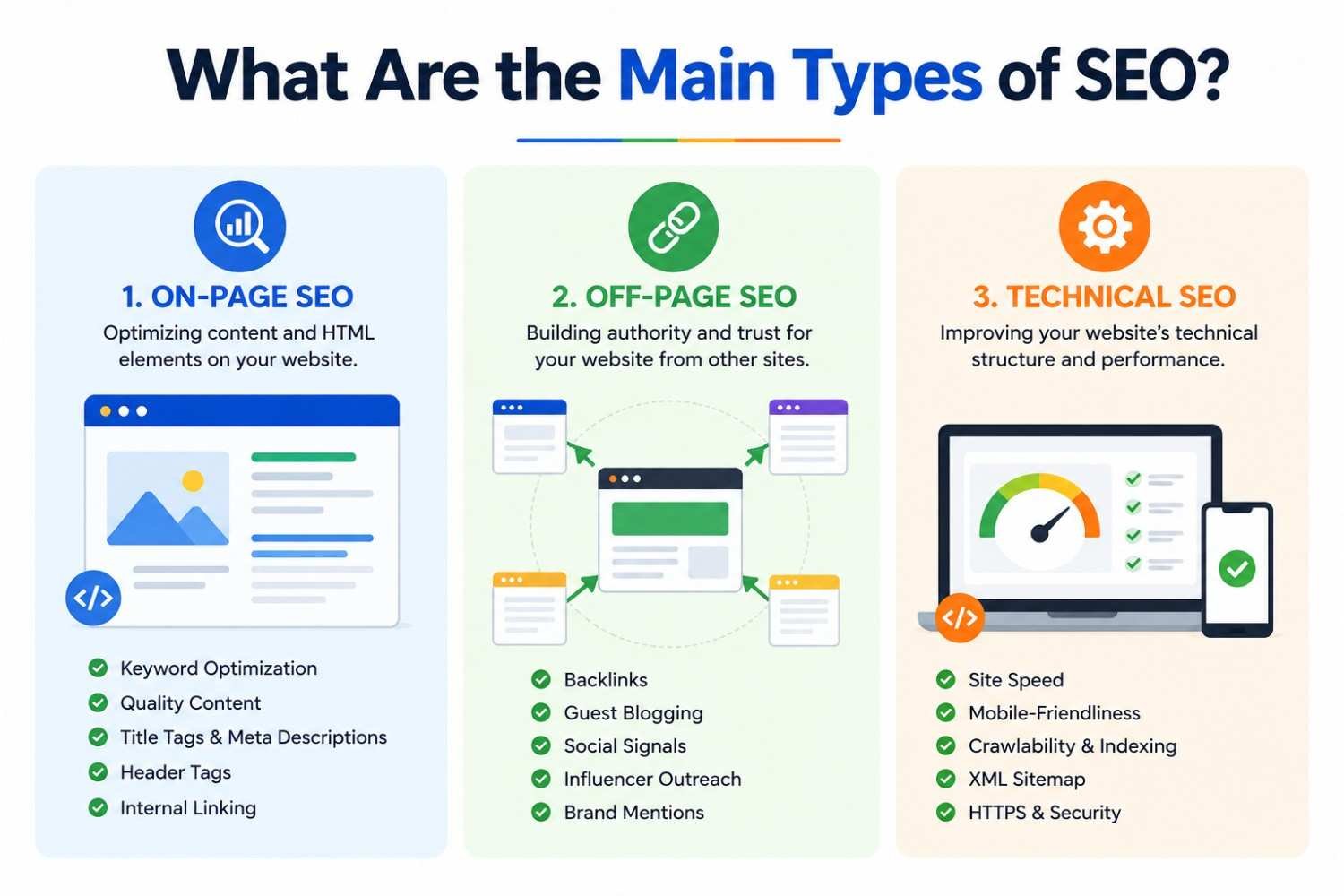
What Are the Main Types of SEO?
SEO is not a single task. It is a combination of different areas that work together to improve how your website performs in search results. Each type focuses on a specific part of your website, from the content users read to the way your site functions.
To get the best results, all three types should be aligned. Ignoring one area can limit your overall performance, even if the others are well managed.
1. On-Page SEO
On-page SEO focuses on everything users see on your website. It is about creating content that is clear, useful, and easy to understand, while also making it simple for search engines to recognize the topic of each page.
This includes:
- Writing content that answers specific questions
- Using keywords in a natural and meaningful way
- Creating clear titles and structured headings
- Organizing content into short, readable sections
- Adding internal links to related pages
- Optimizing images with proper descriptions
The main goal is to make your content helpful and easy to follow. When users quickly find what they need, they are more likely to stay on your site and explore further.
Example: If you create a blog titled “How to Design a Website for Beginners,” it should include step-by-step guidance, simple explanations, and clear headings. Adding examples, such as layout ideas or common mistakes, makes the content more useful.
2. Off-Page SEO
Off-page SEO focuses on how your website is perceived by other websites. It helps build trust and authority by showing that others are referring to your content.
This includes:
- Getting backlinks from relevant and trusted websites
- Publishing guest posts on industry-related platforms
- Earning brand mentions across blogs and media sites
- Building relationships with other websites in your niche
When other websites link to your content, it signals that your information is valuable. However, quality matters more than quantity. A few strong links from trusted sources are more effective than many low-quality ones.
Example: If a well-known marketing blog links to your article about SEO strategies, it strengthens your credibility and increases the chances of your page performing better in search results.
3. Technical SEO
Technical SEO focuses on how your website functions behind the scenes. Even the best content may struggle if the website is slow, difficult to navigate, or not optimized for different devices.
This includes:
- Improving website loading speed
- Ensuring mobile-friendly design
- Using secure connections (HTTPS)
- Creating a clear and organized site structure
- Fixing broken links and errors
- Making pages easy to access and crawl
The goal is to create a smooth and reliable experience for both users and search engines. A well-optimized website makes it easier for visitors to move between pages and find information without frustration.
Example: If your website takes too long to load, users may leave before viewing your content. A faster site keeps users engaged and improves overall performance.
How These Types Work Together
Each type of SEO supports the others.
- On-page SEO ensures your content is useful and clear
- Off-page SEO builds trust through external signals
- Technical SEO ensures your website runs smoothly
For example, even if you have strong content, it may not perform well if your website is slow or difficult to navigate. Similarly, a fast website without useful content will not keep users engaged.
Practical Tips to Balance All Three
- Write content that answers real user questions
- Keep your website structure simple and organized
- Build links from relevant and trusted sources
- Regularly check your website performance and fix issues
- Update your content to keep it accurate and useful
When all three types of SEO work together, your website becomes easier to understand, easier to use, and more reliable in the eyes of both users and search engines.
What Is Search Intent in SEO?
Search intent is the reason behind a user’s search. It explains what someone wants to achieve when they type a query. Understanding this helps you create content that matches their needs instead of just targeting keywords.
When your content aligns with intent, users stay longer, engage more, and are more likely to take action. If it does not match, they leave and look elsewhere.
Why Search Intent Matters
Search engines aim to show results that solve a user’s problem quickly. This means your content must clearly answer the question or provide a direct solution. For businesses, this helps you reach users at different stages, from learning to making a decision.
Types of Search Intent
Informational: Users want to learn or understand something.
Example: “what is SEO”
Navigational: Users are looking for a specific brand or website.
Example: “Eyes On Solution SEO services”
Transactional: Users are ready to take action.
Example: “hire SEO company in Dubai”
Commercial: Users are comparing options.
Example: “best SEO agency in Dubai”
How to Identify Intent
Look at the search query and the type of content ranking. If results are guides, the intent is informational. If they are service pages, the intent is likely transactional.
Simple Example
Search: “best SEO agency in Dubai” The user wants to compare services, not read definitions.
How to Match Your Content
Answer the query directly, use clear headings, include examples, and guide users to the next step. Before creating content, ask: what does the user expect to find? Matching that expectation is key.
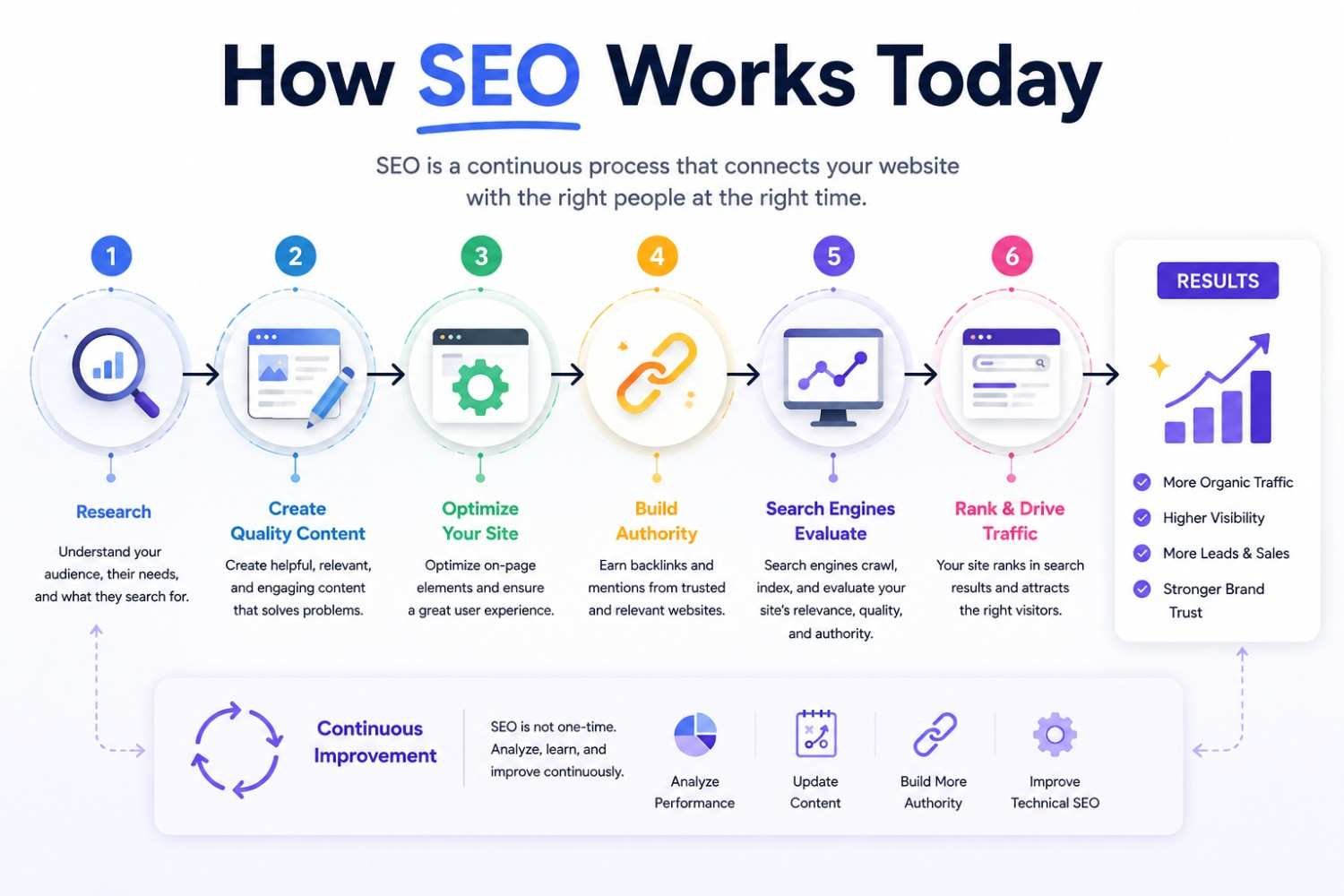
How SEO Works Today
SEO today is focused on delivering clear, useful, and relevant content that matches what users are searching for. It is no longer enough to place keywords on a page. Search engines now look at how well your content answers a query, how easy your website is to use, and whether users find your page helpful.
The priority has shifted toward clarity, structure, and user experience. Websites that provide direct answers, simple navigation, and smooth performance are more likely to perform well.
What Matters Most Today
Content that solves real problems
Your content should focus on helping users complete a task or understand something clearly. Avoid general explanations and provide practical value.
Clear and organized structure
Use headings, short paragraphs, and logical flow. This makes your content easier to read and understand.
Website performance and mobile usability
Your site should load quickly and work properly on all devices. A slow or difficult website can cause users to leave.
Trust and credibility
Links from relevant websites and consistent, well-presented content help build reliability.
User engagement
If users stay, read, and explore your site, it shows your content is useful.
Focus on User Intent
Your content must match what the user expects. If someone searches for a guide, provide clear steps. If they are comparing services, help them evaluate options.
Simple Example
Search: “how to improve website performance” A strong page will include clear steps, practical tips, and easy navigation. SEO today is about being clear, helpful, and easy to follow.
Common SEO Mistakes to Avoid
Many websites underperform due to simple issues that affect clarity and usability. Fixing these can quickly improve how users interact with your site and how your pages perform.
1. Ignoring User Intent
Content that does not match what the user is looking for will not work. If someone wants guidance but finds general information, they will leave. Always focus on answering the exact need behind the search.
2. Overusing Keywords
Forcing keywords into content makes it hard to read. Instead, write naturally and focus on explaining the topic clearly.
3. Slow or Difficult Website
If your site loads slowly or is hard to navigate, users will not stay. Make sure your pages load quickly and work well on mobile devices.
4. Unclear Headings
Headings should guide the reader. Vague titles confuse users, while clear headings make content easier to follow.
5. Outdated Content
Old information reduces trust. Review and update your pages regularly to keep them accurate and useful.
6. Low-Quality Links
Links from irrelevant sources do not help. Focus on getting links from trusted and related websites.
7. Weak Structure
Long paragraphs and poor formatting make content difficult to read. Break content into sections with clear flow.
Quick Check
Before publishing, ask:
- Does this answer a clear question?
- Is it easy to read?
- Is the information current?
Clear, useful, and structured content always performs better.
How to Start SEO (Beginner Guide)
Starting SEO may seem complex at first, but it becomes manageable when you follow a clear process. The goal is simple, understand what your audience is searching for and create a website that answers those needs clearly and effectively.
Step-by-Step Approach to Start SEO
Find What Your Audience Is Searching
The first step is research. You need to know what people are looking for before creating content. Focus on real queries, common questions, and specific problems your audience wants to solve. For example, a business in Dubai might target searches like “SEO services in Dubai” or “how to improve website ranking.” These phrases show clear intent and help guide your content direction.
Quick Tip
Focus on specific search phrases instead of broad terms. They attract more relevant visitors.
Create Content That Solves Problems
Once you understand user queries, create content that answers them clearly. Avoid general information and focus on practical value. Explain topics in simple language, include step-by-step guidance, and use examples where possible. This makes your content easier to follow and more useful.
Example
Instead of a general SEO page, create a guide like “How to Improve Website Ranking for Small Businesses.”
Structure Your Pages Properly
A well-organized page improves readability and helps users find information quickly. Use clear headings, short paragraphs, and logical flow.
Break content into sections so users can scan and understand it easily.
Quick Tip
If a section feels too long, divide it into smaller parts with clear headings.
Improve Website Performance
Your website should load quickly and work smoothly on all devices. A slow or difficult-to-use website can cause users to leave. Make sure navigation is simple and the layout works well on mobile.
Build Trust Through Links
Links from relevant websites help strengthen your credibility. Focus on quality rather than quantity. For example, a link from a trusted industry blog adds more value than multiple low-quality links.
Track and Improve Results
SEO requires regular monitoring. Review which pages perform well and update content based on what works.
Quick Tip
Improve existing content instead of always creating new pages.
Simple Way to Understand SEO
SEO is a process of understanding user needs, creating helpful content, improving website usability, and building trust.
Actionable Steps You Can Apply Today
Update your page titles, add FAQs, improve content structure, and connect related pages. Small improvements can make your website more effective and easier to use.
How Content Helps SEO
Content plays a central role in SEO because it is what users read, interact with, and rely on when making decisions. A website without strong content may attract visitors, but it will struggle to keep them engaged or guide them toward action.
Search engines look for pages that clearly explain a topic and provide useful information. This means your content should not just exist, it should serve a clear purpose and help the reader in a practical way.
What Makes Content Effective for SEO
Easy to understand: Content should be written in simple language so users can quickly grasp the message without confusion. Avoid complicated explanations and focus on clarity.
Provides direct answers: Users often search with a specific question in mind. Your content should address that question early and clearly, then expand with supporting details.
Includes real examples: Examples make your content more relatable and easier to follow. They help users see how the information applies in real situations.
Structured for quick reading: Most users scan content before reading it fully. Clear headings, short paragraphs, and bullet points make it easier to navigate.
Why Content Matters for Your Website
Good content keeps users on your site longer and encourages them to explore more pages. When users find what they need without confusion, they are more likely to trust your website.
It also helps search engines understand your page better. Clear and focused content makes it easier to match your page with relevant searches.
Practical Example
Instead of writing a general blog about website design, create a guide like “Steps to Design a Business Website.”
Include:
- Clear steps
- Simple explanations
- Practical tips
- Visual or real-life examples
This approach makes your content more useful and easier to follow.
How to Improve Your Content Today
- Focus on one main topic per page
- Answer common questions clearly
- Use examples to explain your points
- Break content into smaller sections
- Keep your writing simple and direct
- Update your content when needed
Simple Way to Think About It
Content works best when it helps the reader achieve something. Whether it is learning a concept, solving a problem, or making a decision, your content should guide them step by step. When your content is clear, helpful, and easy to navigate, it becomes more effective for both users and search engines.
Internal Linking Strategy
Internal linking helps connect different pages on your website so users can easily find related information. It also improves how your website is organized, making it easier for search engines to understand your content and structure. Instead of leaving this blog as a standalone page, you should guide readers toward relevant services based on what they are learning.
Where to Add Internal Links
As users read about SEO basics, they may want deeper or practical support. This is where internal links become useful.
You can naturally connect this blog to key service pages such as:
- SEO Optimisation: Link this when discussing how SEO works or how to improve website performance.
- SEO Link Building: Add this when explaining backlinks or off-page SEO.
- Guest Post Services: Use this when mentioning outreach or gaining links from other websites.
- Content Writing Services: Link this in sections related to content creation and optimization.
How to Use Internal Links Effectively
- Place links where they naturally fit within the content
- Use clear anchor text that explains what the page is about
- Avoid adding too many links in one section
- Guide users to the next logical step based on their intent
Example in Context
If you are explaining how content impacts SEO, you can guide users to your content writing service for professional support. If you are discussing backlinks, you can direct them to your link building or guest posting services.
Why This Matters
Internal linking keeps users engaged by helping them explore more pages without confusion. It also increases the chances of turning a reader into a potential client by guiding them toward relevant services. A well-connected website feels more complete, easier to navigate, and more useful for both users and search engines.
Ready to Turn SEO Into Real Results? Start Now
SEO is not just about having a website, it is about making it work for your business. If your site is not bringing the right visitors or converting them into clients, something needs to change. Clear content, strong structure, and the right strategy make all the difference. Do not let your competitors take the lead. Take action now and let our team at Eyes On Solution help you improve your website and get measurable results. Contact us today to get started.