
The transition from Universal Analytics (UA) to Google Analytics 4 (GA4) completely changed how marketers approach content drilldown. While UA offered a built-in “Content Drilldown” report based on URL structures, GA4 requires a more strategic approach using Explorations and Content Grouping. This guide explains how to analyze content performance in GA4, why content-level analysis is critical for SEO, Generative Engine Optimization, and Answer Engine Optimization, and how businesses can leverage these insights to drive growth. We will cover the shift from session-based to event-based tracking, step-by-step instructions for creating content drilldown reports, and advanced techniques for optimizing your content strategy in the era of AI search.
What Content Drilldown Means in Modern Analytics
Content drilldown is the process of analyzing website performance by grouping pages into logical categories, folders, or content types rather than looking at individual URLs in isolation. This hierarchical approach allows digital marketers and SEO professionals to understand which sections of a website drive the most engagement, conversions, and organic traffic.
In the past, Universal Analytics made this simple with a dedicated report that grouped pages by their directory structure (e.g., /blog/, /services/, /products/). However, as of July 2024, all Universal Analytics properties have been permanently deleted. Google Analytics 4 replaced the old session-based model with an event-based measurement model. This means that “content drilldown” is no longer a pre-packaged report; it is a methodology you must actively configure using GA4’s Explorations and Content Grouping features.
Why is this content-level analysis so critical today? For businesses looking to grow, understanding content performance is the foundation of effective digital marketing. It is not enough to know that your website gets traffic; you need to know which types of content are attracting the right audience. This is especially true for SEO, content marketing, GEO, AEO, and AI search visibility. By identifying top-performing content clusters, you can allocate your marketing budget more efficiently, replicate successful strategies, and fix underperforming sections.
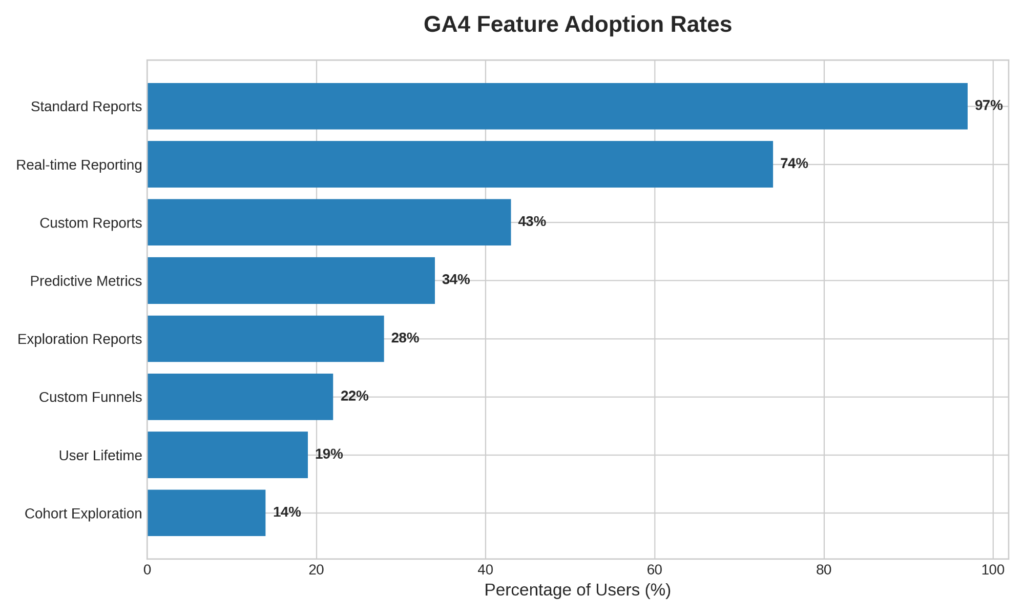
As the chart above shows, while 97% of GA4 users utilize standard reports, only 28% leverage Exploration reports, which are essential for deep content analysis. This presents a massive opportunity for businesses to gain a competitive edge by mastering these advanced features.
What Is Content Drilldown in Google Analytics?
How Do You Define Content Drilldown?
Content drilldown is a method of website analysis that groups individual pages into broader categories to evaluate performance at the section or directory level. Instead of analyzing 500 individual blog posts, a content drilldown allows you to see how the entire “Blog” section performs compared to the “Services” section or the “Knowledge Base.”
This hierarchical analysis is crucial because it aligns your analytics data with your website’s architecture. It allows you to group pages by folders, categories, sections, or content types. For example, an e-commerce site might group content by product categories (e.g., “Men’s Shoes,” “Women’s Apparel”), while a B2B service provider like Eyes On Solution might group content by service offerings (e.g., “SEO Services,” “Content Writing,” “Web Development”).
Why Does Content Drilldown Matter for Your Business?
Content drilldown is not just an analytics exercise; it is a strategic tool that directly impacts your bottom line. When implemented correctly, it provides actionable insights that drive business growth.
First, it identifies top-performing content categories. By looking at aggregated data, you can quickly see which topics resonate most with your audience. If your articles on “Local SEO” are driving significantly more engaged sessions than articles on “Social Media,” you know where to focus your future content efforts.
Second, it reveals weak content sections. Identifying areas of your site with high bounce rates or low engagement times allows you to diagnose and fix issues before they impact your overall search rankings.
Third, it supports content optimization and SEO strategies. Search engines reward websites that provide comprehensive, well-structured information. Content drilldown helps you measure user engagement by content clusters, allowing you to build topical authority and improve internal linking structures.
How Content Drilldown Works in GA4
What Changed in the Shift from Universal Analytics to GA4?
The shift from Universal Analytics to GA4 represents a fundamental change in how data is collected and analyzed. Universal Analytics relied on a session-based model, focusing on pageviews and user sessions. GA4 uses an event-based measurement model, where every interaction, from a pageview to a scroll to a button click, is recorded as an event.
| Feature | Universal Analytics | Google Analytics 4 |
|---|---|---|
| Data Model | Session-based (pageviews) | Event-based (all interactions) |
| Content Drilldown | Built-in report based on URL paths | Requires custom Explorations and Content Groups |
| Cross-Device Tracking | Limited | Native (Google Signals + User ID) |
| Engagement Metric | Bounce Rate | Engagement Rate & Average Engagement Time |
| Custom Parameters | Limited to 3 pre-defined parameters per event | Up to 25 unique parameters per event |
This shift is why many old tutorials and guides are now completely outdated. You can no longer navigate to Behavior > Site Content > Content Drilldown. Instead, you must build the reports yourself. While this requires a steeper learning curve, it offers far more flexibility and deeper insights.
Which Key GA4 Reports Are Used for Content Drilldown?
To perform a content drilldown in GA4, you will rely on a combination of standard reports and custom configurations:
- Pages and Screens Report: This is the closest equivalent to the old “All Pages” report. It shows performance metrics for individual URLs and page titles.
- Landing Page Report: This report is critical for understanding which pages are bringing users to your site from search engines and other sources.
- Explorations: This is where the true power of GA4 lies. The Free Form Exploration allows you to build custom tables and charts to analyze content hierarchies.
- Content Grouping: This feature allows you to categorize pages into custom buckets (e.g., “Blog,” “Services,” “About”) to see metrics for related groups of information.
- Traffic Acquisition Report: This helps you understand how different traffic sources (Organic Search, Direct, Referral) interact with your content.
Setting Up Content Grouping in GA4
What Is Content Grouping and How Do You Use It?
Content grouping is the foundation of effective content drilldown in GA4. It allows you to categorize pages and screens into custom buckets, enabling you to analyze performance at the category level rather than just the page level. Without content grouping, you are stuck looking at a chaotic list of individual URLs.
What Are the Methods for Creating Content Groups?
There are several ways to implement content grouping in GA4, ranging from simple interface settings to advanced Google Tag Manager configurations.
Page Path Based Grouping: The easiest method is to create segments or filters based on the URL path. If your website has a clean structure (e.g., eyesonsolution.com/services/seo), you can group all URLs containing /services/ into a “Services” group.
GTM Implementation: For more complex websites, using Google Tag Manager is the most robust method. You can create a parameter in the data layer that assigns specific values to pages, which GA4 then reads as a content group. This is ideal if your URL structure is not perfectly organized by category.
What Are the Best Practices for Modern Websites?
When setting up content groups, think about how your target audience navigates your site and what information is most valuable to your business goals. Common and effective content groups include:
- Blog Categories: Group articles by topic (e.g., “SEO Tips,” “Content Strategy,” “Web Design”).
- Service Pages: Group your core offerings (e.g., “SEO Services,” “Content Writing,” “Guest Posting”).
- Product Collections: For e-commerce, group items by type or brand.
- Resource Hubs: Group case studies, whitepapers, and downloadable guides.
- Knowledge Bases: Group FAQs and support documentation.
By structuring your analytics to mirror these business priorities, you can easily track which areas of your site are driving the most value.
How to Create a Content Drilldown Report in GA4
How Do You Build a Drilldown Report Using Explorations?
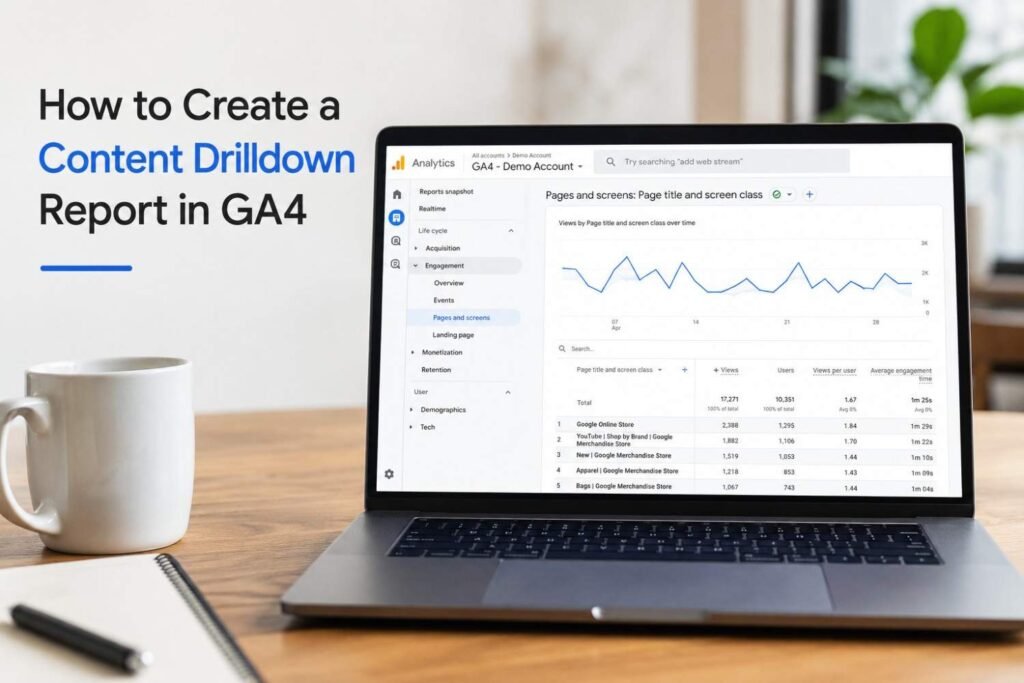
Since GA4 does not have a pre-built content drilldown report, you must create one using the Explorations tool. Here is a step-by-step guide to building a comprehensive content performance report.
Step 1: Open Free Form Exploration Navigate to the “Explore” tab in the left-hand menu of GA4 and select a “Free form” template. This provides a blank canvas for building your report.
Step 2: Add Dimensions Dimensions are the attributes of your data. Click the “+” icon next to Dimensions and import the following:
- Page path and screen class (or Page path + query string)
- Page title
- Content group (if you have configured it)
- Session default channel group (to see traffic sources)
Step 3: Add Metrics Metrics are the quantitative measurements. Click the “+” icon next to Metrics and import:
- Total users
- Sessions
- Views
- Engaged sessions
- Average engagement time
- Conversions
- Total revenue (if applicable)
Step 4: Build Content Hierarchies Drag your dimensions into the “Rows” section and your metrics into the “Values” section. To create the drilldown effect, place “Content group” as the primary row, followed by “Page path.” This allows you to see the aggregated performance of a category, and then look at the individual pages within that category.
Key Metrics to Analyze in a Content Drilldown
Which Traffic Metrics Indicate Content Visibility?
Traffic metrics tell you how many people are finding and viewing your content.
- Users: The total number of unique individuals who visited the content group.
- Sessions: The number of individual browsing sessions that included the content.
- Views: The total number of times pages within the group were loaded.
While these metrics are important for measuring overall reach, they do not tell the whole story. High traffic with low engagement often indicates a mismatch between user intent and content delivery.
How Do You Measure True Content Engagement?
GA4 introduced new engagement metrics that provide a much clearer picture of content quality than the old Universal Analytics bounce rate.
Engagement Rate: The percentage of sessions that lasted longer than 10 seconds, resulted in a conversion, or had two or more page views. This is a critical metric for evaluating content quality.
Average Engagement Time: How long the user actively had the webpage in focus on their screen. High engagement time on a blog post suggests the content is readable and valuable.
Scroll Tracking: GA4 automatically tracks when users scroll past 90% of a page. This helps determine if people are actually reading your long-form content.
What Conversion Metrics Prove Content ROI?
Ultimately, your content needs to drive business results. By looking at conversion metrics within your content drilldown, you can prove ROI.
Lead Form Submissions: Which content categories drive the most inquiries?
Purchases: For e-commerce, which product groups generate the most revenue?
Phone Calls: Are users clicking the “Contact Us” or WhatsApp links after reading specific service pages?
Which SEO Metrics Should You Monitor?
When combining GA4 data with SEO goals, focus on:
Organic Traffic Performance: Filter your exploration to only show “Organic Search” traffic to see how content groups perform in search engines.
Landing Page Growth: Monitor which content groups are increasingly acting as the first touchpoint for new users.
Search Intent Alignment: If a page ranks well but has a low engagement rate, it may not be answering the user’s actual search query.
Using Content Drilldown for SEO Optimization
How Can You Identify High Traffic Content Clusters?
By analyzing your content groups, you can identify “topic clusters” that naturally attract traffic. If your “Technical SEO” content group consistently outperforms other categories, it signals to search engines (and to your marketing team) that your website has strong topical authority in that area. You should double down by creating more content within that successful cluster.
What Is the Best Way to Find Underperforming Content Categories?
Conversely, content drilldown highlights areas that need improvement. If you have a “Guest Posting” service page group that receives traffic but has an average engagement time of 12 seconds and zero conversions, that content needs to be rewritten. It may lack clarity, fail to address user pain points, or have a poor user interface.
How Do You Discover Internal Linking Opportunities?
Content drilldown helps optimize internal linking. If you identify a high-traffic, high-authority blog post, you can strategically place internal links within that post pointing to your lower-traffic, high-conversion service pages. This passes “link juice” and guides engaged users toward conversion points.
Why Must You Improve Content Depth and Relevance?
Search engines prioritize content that thoroughly answers user queries. If your drilldown shows low engagement across a specific category, it often means the content is too thin. Expanding those pages with more detailed information, FAQs, and structured data can improve both user experience and search rankings.
Content Drilldown for GEO, AEO, and AI Search Optimization
The landscape of search is changing rapidly. Generative Engine Optimization and Answer Engine Optimization are becoming just as important as traditional SEO. AI Overviews (formerly SGE) and tools like ChatGPT and Claude are changing how users find information.
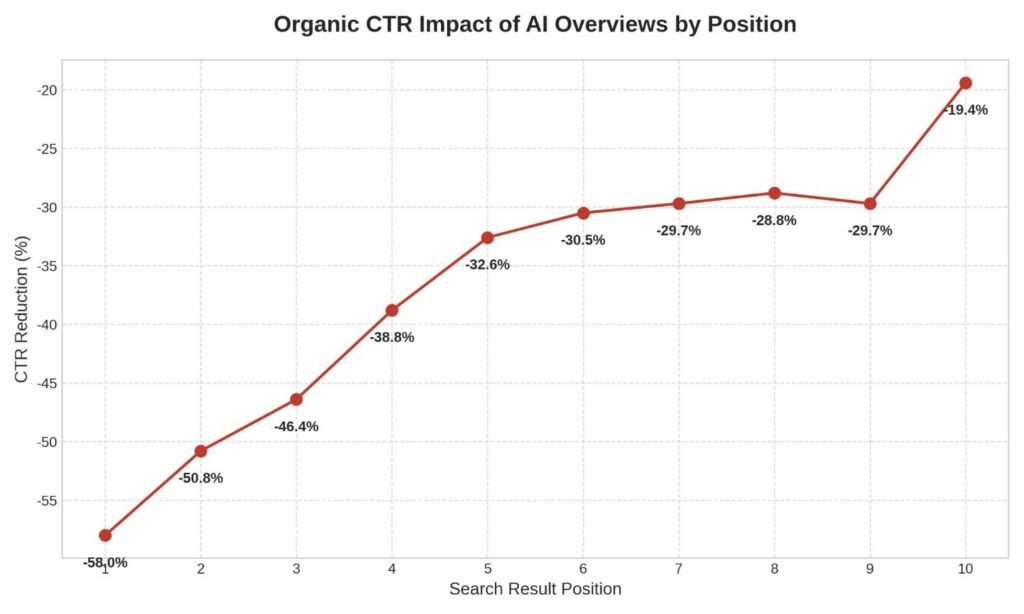
Recent data shows that AI Overviews are significantly impacting traditional organic traffic. As of December 2025, the presence of an AI Overview reduces the organic click-through rate for the position one search result by a staggering 58%. This means businesses must adapt their content strategies to be visible within these AI systems.
How Does GA4 Help Measure GEO Performance?
GEO focuses on optimizing content to be cited by AI search engines. While GA4 cannot directly track queries made inside ChatGPT, it can track referral traffic from these platforms. By creating a content drilldown that segments traffic sources, you can monitor increases in traffic from AI platforms, which serves as a strong signal of content authority and GEO success.
What Is the Best Approach for Measuring AEO Success?
AEO is about providing direct, concise answers to specific questions. You can measure AEO success in GA4 by tracking the performance of question-based content and FAQ sections. If your drilldown shows high engagement on pages structured around “What is…” or “How to…” queries, your AEO strategy is working.
How Can You Track AI Overview Impact?
Tracking the impact of Google’s AI Overviews requires monitoring organic landing page changes. If a historically high-performing page suddenly loses traffic but maintains its ranking position, it is likely being suppressed by an AI Overview. Conversely, if you notice a spike in traffic to highly structured, expert-driven pages, your content may be getting cited by the AI system.

What Content Structures Perform Best in AI Search?
To succeed in an AI-driven search environment, your content drilldown should prioritize specific structures:
- Topic Clusters: Comprehensive hubs of interconnected content.
- Entity-Based Content: Content that clearly defines concepts, people, and organizations.
- FAQ Sections: Direct answers to common questions, formatted with proper schema markup.
- Expert-Driven Content: Content that demonstrates Experience, Expertise, Authoritativeness, and Trustworthiness (E-E-A-T).
Advanced Content Drilldown Techniques
Why Should You Segment Content by Traffic Source?
Not all traffic behaves the same way. A user arriving from Organic Search has different intent than a user clicking a link on Social Media. By adding “Session source/medium” to your Exploration report, you can see how your content groups perform across different channels (Organic, Direct, Referral, Social, AI Platforms).
How Do You Analyze Content by Device Type?
Content that looks great on a desktop might be unreadable on a mobile device. Segmenting your drilldown by device category (Mobile, Desktop, Tablet) can reveal technical issues. If a content group has a 60% engagement rate on desktop but a 20% engagement rate on mobile, you need to fix your mobile layout immediately.
What Can You Learn by Comparing New vs. Returning Users?
Returning users are often closer to making a purchasing decision. By comparing how new vs. returning users interact with your content groups, you can tailor your messaging. For example, new users might spend more time on educational blog posts, while returning users might navigate directly to service pages and pricing information.
Common Content Drilldown Mistakes to Avoid
Why Is Relying Only on Pageviews Dangerous?
Pageviews are a vanity metric. A page with 10,000 views and a 5-second average engagement time is performing worse than a page with 1,000 views and a 3-minute engagement time. Always prioritize engagement and conversion metrics over raw traffic numbers.
What Happens When You Ignore Engagement Metrics?
Ignoring metrics like Engagement Rate and Average Engagement Time means you are blind to user experience. If users are leaving your site immediately, search engines will notice, and your rankings will suffer.
Why Must You Set Up Content Groups?
Failing to set up content groups means you are analyzing data at the micro-level (individual URLs) rather than the macro-level (business categories). This makes it nearly impossible to spot broader trends or evaluate the success of your overall content strategy.
You May Also Like to Read: How Do I Recover from the Google May 2026 Core Update? A Complete Guide to GEO, AEO, and Restoring Search Traffic
Are You Using Universal Analytics Workflows in GA4?
Trying to force GA4 to act like Universal Analytics will only lead to frustration. Embrace the event-based model and learn to use Explorations. The old workflows are dead; the new tools are more powerful if you take the time to learn them.
Tools That Complement GA4 Content Drilldown
While GA4 is powerful, it works best when integrated with other tools in your marketing stack.
How Does Google Search Console Enhance GA4 Data?
Google Search Console provides the missing piece of the puzzle: the exact search queries users typed into Google before clicking your link. By linking GSC to GA4, you can see which keywords are driving traffic to your specific content groups.
Why Use Looker Studio for Content Reporting?
Looker Studio (formerly Google Data Studio) allows you to turn complex GA4 Explorations into easy-to-read, automated dashboards. This is ideal for sharing content performance metrics with clients or stakeholders who don’t want to navigate the GA4 interface.
What Role Do SEO Platforms Play?
Tools like Semrush, Ahrefs, and Screaming Frog SEO Spider provide competitive analysis and technical auditing that GA4 cannot. Use these tools to identify keyword gaps and technical errors, and use GA4 to measure how users interact with the content you create to fill those gaps.
Future of Content Analysis in GA4
How Is AI Driving Analytics Forward?
Google is heavily investing in AI-driven analytics. GA4 already includes automated insights that alert you to significant changes in data trends. In the future, expect GA4 to offer more proactive recommendations on how to improve specific content groups based on user behavior patterns.
What Is the Role of Predictive Metrics?
Currently, only 34% of GA4 users leverage predictive metrics like purchase probability and churn probability. As these models become more sophisticated, marketers will be able to use content drilldown not just to see what happened in the past, but to predict which content will drive the most revenue in the future.
How Will We Measure Visibility Across Search, AI Overviews, GEO, and AEO?
As the search landscape fragments across traditional results, AI Overviews, and conversational AI tools, analytics platforms will need to adapt. Future content analysis will require a holistic approach, measuring a brand’s total “share of voice” across all digital touchpoints, rather than just tracking clicks from ten blue links.
Content drilldown has evolved significantly with the transition to GA4. It is no longer a simple, pre-packaged report, but a strategic methodology that requires careful configuration of Content Groups and Explorations.
Modern content analysis demands a focus on engagement, conversions, and adaptability to new search paradigms like AI Overviews and GEO. Businesses that combine robust SEO strategies with deep, data-driven content analysis will gain a significant competitive advantage. By understanding exactly how your audience interacts with your content, you can refine your messaging, build stronger authority, and turn your website into a powerful engine for steady, predictable growth.
FAQs
What replaced the Content Drilldown report in GA4?
The Universal Analytics Content Drilldown report was replaced by the Explorations feature in GA4. You must now create a custom “Free form” exploration and use “Content group” and “Page path” dimensions to replicate and enhance the old drilldown functionality.
How do I create content groups in Google Analytics 4?
You can create content groups in GA4 by using Google Tag Manager to send a content_group parameter with your pageview events, or by creating custom dimensions and segments based on your website’s URL path structure directly within the GA4 interface.
Which GA4 metrics are most important for content analysis?
The most important metrics for content analysis in GA4 are Engagement Rate, Average Engagement Time, Conversions, and Engaged Sessions. These provide a much more accurate picture of content quality than traditional metrics like raw pageviews or the outdated bounce rate.
Can GA4 track AI Overview traffic?
GA4 cannot perfectly isolate traffic coming specifically from an AI Overview versus a traditional organic search result, as both are often classified as “Google / Organic.” However, you can monitor sudden drops in CTR for top-ranking pages in Google Search Console, which strongly indicates AI Overview interference.
How does content drilldown improve SEO performance?
Content drilldown improves SEO by identifying high-performing topic clusters to expand upon, revealing underperforming pages that need optimization, and highlighting opportunities for strategic internal linking to distribute page authority throughout your site.
What is the difference between content grouping and content drilldown?
Content grouping is the technical setup process of categorizing individual URLs into logical buckets (e.g., “Blog,” “Services”). Content drilldown is the analytical action of using those groups in a report to analyze performance from the top category level down to the individual page level.
How can GA4 support GEO and AEO strategies?
GA4 supports Generative Engine Optimization and Answer Engine Optimization by allowing you to track engagement metrics on highly structured, question-based content, and by monitoring referral traffic from AI platforms to gauge your brand’s visibility in AI-driven answers.
Which reports should marketers use instead of the old UA Content Drilldown report?
Marketers should use GA4’s “Pages and screens” report for basic URL analysis, the “Landing page” report to understand entry points, and custom “Free form” Explorations utilizing Content Groups for deep, hierarchical content performance analysis.